Codice Input Services
Codice Input Services turn a badge or card scanner attached to a player into Codice events, without a separate middleware service. Each scan lands a marker at a fixed point on the wall, exactly as if the person had placed their physical Codice there. Adding, configuring and testing scan stations requires an Administrator account.
Linux players only
Codice Input Services are not yet supported on Windows players. Outside systems on any platform can use the External Codice event API instead.
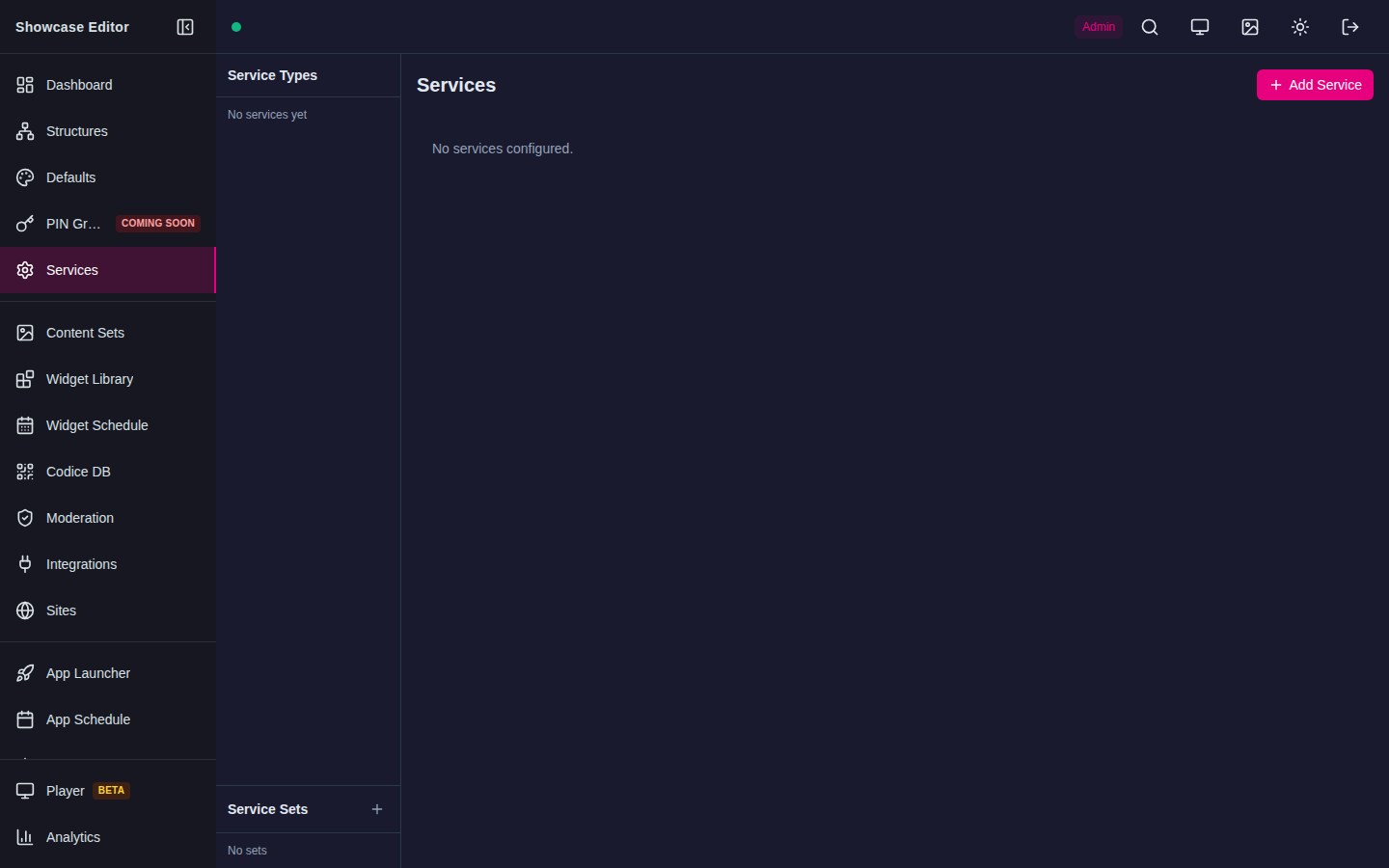
Choose Add Service to add a Codice Input service. The empty state confirms no scanner currently owns an input device.
Add a scan station
- Connect the scanner to the player computer.
- In the Showcase Editor, open Services and select Add Service.
- In the New Service dialog, set Type to Codice Input, choose the Service Set, enter a Name, and select Create.
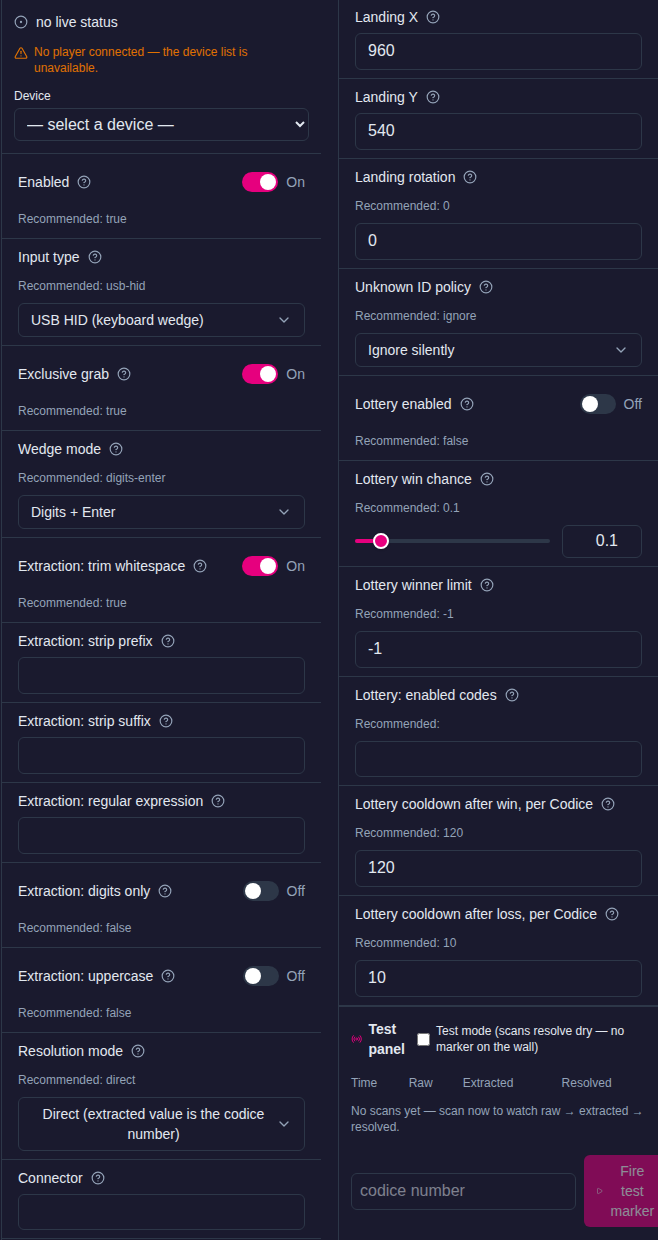
- Open the new service and set Input type:
- USB HID (keyboard wedge) for scanners that type characters, like a keyboard.
- Serial / ASCII for line-oriented readers on a serial port.
- Choose the Device from the list. The connected player fills the list live.
- Set the extraction and resolution options described below.
- Set Landing X, Landing Y and Landing rotation.
- Test the station with the test panel and a non-production code.
Keyboard-wedge scanners
- Configure the scanner to append Enter after each scan.
- Set Wedge mode: Digits + Enter (the default) reads numeric badges; ASCII line reads any printable characters up to Enter.
- Choose the stable
/dev/input/by-id/...-event-kbddevice. - Leave Exclusive grab on. It stops scans from typing into the operating system or another application. Turn it off only for diagnosis.
On Linux the service needs permission to read and exclusively grab the input device.
Serial scanners
- Choose the stable
/dev/serial/by-id/...device. - Set Serial baud rate: 9600 (default), 19200, 38400, 57600, or 115200.
- Line endings are detected automatically. CR, LF and CRLF all work, so there is no line-ending setting.
Serial support assumes line-oriented text. Proprietary binary protocols, vendor drivers, and unsupported baud/framing combinations require separate integration work.
Extract the ID from the scan
The extraction options apply in this order:
- Extraction: trim whitespace (on by default)
- Extraction: strip prefix
- Extraction: strip suffix
- Extraction: regular expression. The first capture group becomes the ID; with no group, the whole match is used. For example,
M-(\d+)turnsM-10442into10442. - Extraction: digits only
- Extraction: uppercase
Resolve the ID to a person
Set Resolution mode:
- Direct (extracted value is the codice number) (the default) looks the number up in Codice DB. No connector is needed.
- Mapped (resolve via connector external IDs) resolves the value through the external-ID aliases of the Connector you choose. Use it when badges carry a membership or ticket number rather than a Codice number. See Aliases.
Unknown ID policy decides what happens when a scan matches no code: Ignore silently (the default) or Show 'card not recognised' on the wall. This setting applies to this station only.
Where the marker lands
Landing X and Landing Y are the landing point in scene pixels on the wall canvas, and Landing rotation is the orientation of the opened menu in degrees. A station without a landing point rejects scans instead of placing a marker at the corner of the wall.
Each station has its own landing point, so scan stations do not use the drop zones of the External Codice event API.
Lottery
A station can run a win/lose lottery on every scan, like the Codice Lottery widget. A winning scan lands its marker as usual; a losing scan lands nothing. Turn on Lottery enabled, then set:
| Setting | Default | Meaning |
|---|---|---|
| Lottery win chance | 0.1 | Chance to win, from 0 (never) to 1 (always) |
| Lottery winner limit | -1 | Maximum winners at this station while the server is running; zero or less means no limit |
| Lottery: enabled codes | empty | Codes that enter the lottery, separated by spaces or commas. Empty means every code. Codes not in a non-empty list are never entered and are dispatched normally |
| Lottery cooldown after win, per Codice | 120 | Seconds before a winning code can enter again. Scans during the cooldown land nothing |
| Lottery cooldown after loss, per Codice | 10 | Seconds before a losing code can enter again. Scans during the cooldown land nothing |
Test a station
The test panel is below the service settings.
- Test mode makes scans resolve without landing a marker on the wall. The panel lists recent scans with their raw, extracted and resolved values, so you can check the extraction settings. Test mode switches itself off after 5 minutes so a forgotten toggle cannot mute a station.
- Fire test marker sends a test scan for a code you enter. With test mode off, it lands a real marker at the station's landing point.
To stop a station without deleting its settings, turn off Enabled. The device is released while the station is disabled.
Status and reconnect
The player reports each service's health and the available devices to the editor. A disconnected scanner moves the service out of its healthy state; reconnecting the same stable device recovers it without restarting Showcase. Configure each device in one service only.
Troubleshooting
- No scan: check that the device appears in the list, its permissions, which service owns it, the baud rate, the landing point, and the player connection.
- Wrong scan: turn on Test mode and compare the raw and extracted values against the prefix, suffix, regular expression, digits-only, uppercase and trim settings.
- Duplicate scan: make sure only one service owns the device and the scanner sends one line ending per scan.
- Scan works in test mode but nothing appears on the wall: check the lottery settings and cooldowns.
- Permission denied: add the Showcase runtime user to the appropriate input/serial group or udev rule, then log in again or restart as required.
- Does not recover: use
/dev/input/by-idor/dev/serial/by-idpaths rather thaneventN/ttyUSBnpaths, which can change.
Always complete the final acceptance check with the real scanner, cable, player, and landing point. An emulated scanner does not verify the physical device or its operating-system permissions.