Publish a Hosted Site
A Hosted Site is a small web experience served by Showcase. It can be used in a Showcase Web widget or opened directly from the site address.
Showcase accepts:
- a single
.htmlor.htmfile; or - a
.zipcontaining a multi-file site.
A bare HTML upload is installed as index.html, so a one-page prototype does not need to be wrapped in a ZIP.
For ready-made examples you can import and place straight away, see Demo Games.
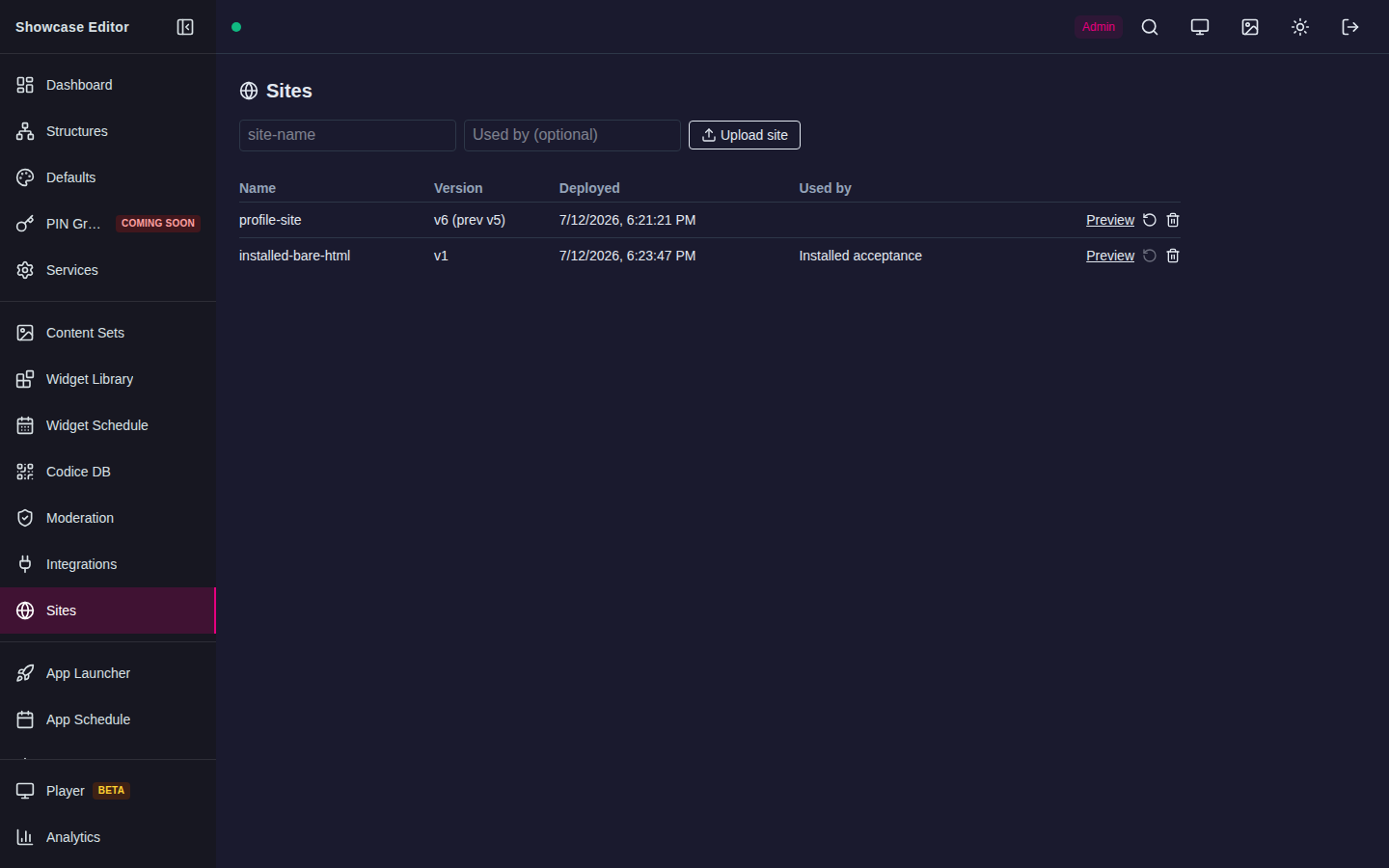
Publish one HTML file
- Test the page in a normal browser first.
- Open Sites in the Showcase Editor.
- Optionally enter a short URL-safe site name, for example
visitor-survey. If you leave it empty, Showcase fills it in from the file name. - Optionally enter Used by, a note about where the site is used.
- Select Upload site and choose
survey.html. - Wait for the confirmation, which names the version and the address it is now live at.
- Select Preview, or open the site address, and confirm the page works.
- Add that address to the appropriate Showcase Web widget.
The upload goes live as soon as it finishes. Showcase stores the file as the site's root index.html and applies the same rollback, size limits, and browser security policy as a ZIP upload.
Publish a multi-file site from ZIP
Use ZIP when the page has local JavaScript, CSS, fonts, images, or nested pages.
Your archive should look like:
index.html
assets/
  site.css
  app.js
  welcome.jpg
index.html must be at the archive root, not inside an extra folder.
- Test the site in a normal browser.
- Create a ZIP containing
index.htmland its assets. - In Sites, enter the site name and select Upload site, then choose the ZIP.
- Test the site address in the same browser engine/device used by the presentation.
Update a site
Uploading a file under an existing site name creates a new version and makes it live immediately. There is no separate staging or activation step, so any wall or widget that shows the site picks up the new version straight away.
- Test the new version before you upload it: in a normal browser, and ideally as a separate test site, uploaded under a different name such as
visitor-survey-test, on the same player the presentation uses. - Upload it under the existing site name at a quiet time, not while an audience is using the wall.
- Check the live site straight away.
Showcase keeps only the current version and the one before it. If the update fails, select the rollback icon (Roll back to previous version) on the site's row. Rollback swaps the two versions, so rolling back a second time returns to the newer version. Uploading again discards the oldest kept version.
Delete and restore a site
Delete a site with the trash icon on its row. Deleting a site that a URL Library placement still uses archives it instead of removing it. An archived site keeps serving, so the presentation keeps working, but it no longer appears in the URL Library picker. Select the Restore icon on its row to return it to the picker. Showcase removes an archived site automatically 7 days after the last placement that used it is gone. A site that nothing uses is deleted straight away.
Content Security Policy
Every Hosted Site is served under the same fixed Content Security Policy — there is no per-site or admin-configurable setting, and no way to allow additional origins. The policy sandboxes the page (scripts and forms are allowed, but the page gets an opaque origin with no access to Showcase's own cookies) and restricts connect-src, img-src, media-src, font-src and style-src to the site itself, with these additions: images may also use data: and blob: URLs, media may use blob:, and fonts may use data:. object-src and framing (frame-ancestors) are disabled outright.
The practical effect: a Hosted Site cannot call an external API or load assets from another domain. Bundle everything the page needs — scripts, styles, fonts and images — inside the site's own ZIP. If a prototype depends on an outside API, it has to be redesigned to work without one (for example, by having a connector or another part of Showcase fetch the data instead), not fixed by loosening the CSP.
If a request works when opening a file locally but fails when hosted, inspect the browser console and check:
- CSP
connect-srcfor API calls — same-origin only, always; - CSP
img-src,media-src, orfont-srcfor assets — same-origin only, plusdata:/blob:for images,blob:for media, anddata:for fonts; - HTTPS mixed-content errors;
- whether the asset is missing from the ZIP rather than blocked.
Common failures
| Message or symptom | Fix |
|---|---|
| File type not accepted | Upload .html, .htm, or .zip only |
| ZIP has no root index | Put index.html at the archive root |
| Page is blank | Check browser console, relative file paths, and CSP |
| Assets are missing | Preserve their relative paths inside the ZIP |
| Outside API is blocked | Expected — Hosted Sites cannot reach external origins at all. Bundle the data with the site or fetch it another way |
| New version broke the presentation | Select Roll back to previous version |