Example configurations
Below you can find some example configurations for specific video wall layouts.
The examples were created using Nvidia Quadro RTX 4000 GPUs and Supermicro X11SPA-T motherboard. GPUs should be connected in order: GPU 1 to slot 1, GPU 2 to slot 3, GPU 3 to slot 5.
You can download the EDID for MT557D Decca below to avoid having to manually export it:
Tip
On Linux, place the downloaded file to the /etc/X11 folder to match the xorg.conf examples below: sudo mv mt557d-edid.txt /etc/X11/
3x1 portrait video wall
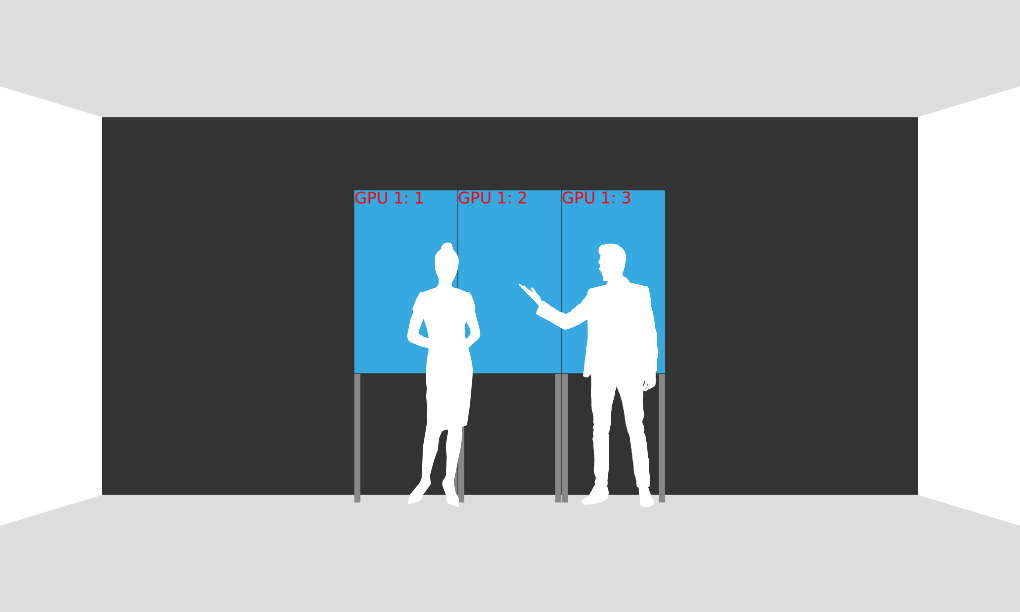
This example 3x1 video wall with portrait displays requires a single GPU. Displays should be connected as shown in the picture above using connectors 1, 2, and 3 as labeled on the GPU.
See below for example configuration using 8 pixel bezel compensation.
Windows
Display layout (configuremosaic.exe)
Show
configuremosaic set rows=1 cols=3 out=0,0 out=0,1 out=0,2 rotate=270 bezel=8,0
screen.xml
Show
<!DOCTYPE mtdoc>
<MultiHead>

  <GPU1 type="window">
    <location>0 0</location>
    <size>3256 1920</size>

    <Area1 type="area">
      <location>0 0</location>
      <size>3256 1920</size>
    </Area1>

    <frameless>1</frameless>
  </GPU1>

</MultiHead>
config.txt
Show
NetBridge {
  host = "10.77.84.101"
  input-rotate = "-90"
  input-translate = "0 1920"
}

NetBridge {
  host = "10.77.84.102"
  input-rotate = "-90"
  input-translate = "1088 1920"
}

NetBridge {
  host = "10.77.84.103"
  input-rotate = "-90"
  input-translate = "2176 1920"
}
Linux
Display layout (xorg.conf)
Show
Section "ServerLayout"
    Identifier     "Layout0"
    Screen      0  "Screen0" 0 0
    Option         "Xinerama" "0"
    Option         "BlankTime" "0"
    Option         "StandbyTime" "0"
    Option         "SuspendTime" "0"
    Option         "OffTime" "0"
EndSection

Section "Device"
    Identifier     "Device0"
    Driver         "nvidia"
    VendorName     "NVIDIA Corporation"
    BoardName      "Quadro RTX 4000"
    BusID          "PCI:141:0:0"
EndSection

Section "Screen"
    Identifier     "Screen0"
    Device         "Device0"
    DefaultDepth    24
    Option         "metamodes" "Connector-0: nvidia-auto-select +0+0 {rotation=right}, Connector-1: nvidia-auto-select +1080+0 {rotation=right}, Connector-2: nvidia-auto-select +2160+0 {rotation=right}"
    Option         "CustomEDID" "Connector-0:/etc/X11/mt557d-edid.txt; Connector-1: /etc/X11/mt557d-edid.txt; Connector-2: /etc/X11/mt557d-edid.txt"
    Option         "ConnectedMonitor" "Connector-0, Connector-1, Connector-2"
EndSection
screen.xml
Show
<!DOCTYPE mtdoc>
<MultiHead>

  <GPU1 type="window">
    <location>0 0</location>
    <size>3256 1920</size>

    <Area1 type="area">
      <location>0 0</location>
      <size>3256 1920</size>
    </Area1>

    <frameless>1</frameless>
  </GPU1>

</MultiHead>
config.txt
Show
NetBridge {
  host = "10.77.84.101"
  input-rotate = "-90"
  input-translate = "0 1920"
}

NetBridge {
  host = "10.77.84.102"
  input-rotate = "-90"
  input-translate = "1088 1920"
}

NetBridge {
  host = "10.77.84.103"
  input-rotate = "-90"
  input-translate = "2176 1920"
}
5x1 portrait video wall
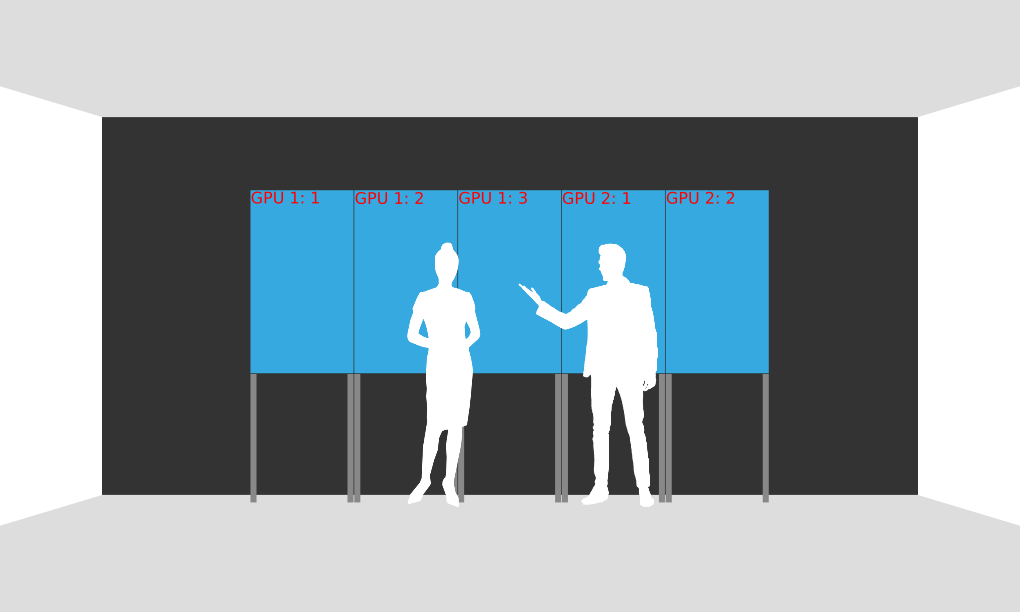
This example 5x1 video wall with portrait displays requires two GPUs. Displays should be connected as shown in the picture above using connectors 1, 2, and 3 as labeled on GPU 1 (slot 1) and connectors 1 and 2 as labeled on GPU 2 (slot 3).
See below for example configuration using 8 pixel bezel compensation.
Windows
Display layout (configuremosaic.exe)
Show
configuremosaic set rows=1 cols=3 out=1,0 out=1,1 out=1,2 rotate=270 bezel=8,0 nextgrid rows=1 cols=2 out=0,0 out=0,1 rotate=270 bezel=8,0
screen.xml
Show
<!DOCTYPE mtdoc>
<MultiHead>

 <GPU1 type="window">
  <location>0 0</location>
  <size>3256 1920</size>

  <Area1 type="area">
    <location>0 0</location>
    <size>3256 1920</size>
  </Area1>
  <frameless>1</frameless>
 </GPU1>

<GPU2 type="window">
  <location>3256 0</location>
  <size>2168 1920</size>

  <Area1 type="area">
    <location>0 0</location>
    <size>2168 1920</size>

    <graphicslocation>3264 0</graphicslocation>
  </Area1>
  <frameless>1</frameless>
</GPU2>

</MultiHead>
config.txt
Show
NetBridge {
  host = "10.77.84.101"
  input-rotate = "-90"
  input-translate = "0 1920"
}

NetBridge {
  host = "10.77.84.102"
  input-rotate = "-90"
  input-translate = "1088 1920"
}

NetBridge {
  host = "10.77.84.103"
  input-rotate = "-90"
  input-translate = "2176 1920"
}


NetBridge {
  host = "10.77.84.104"
  input-rotate = "-90"
  input-translate = "3264 1920"
}

NetBridge {
  host = "10.77.84.105"
  input-rotate = "-90"
  input-translate = "4352 1920"
}
Linux
Display layout (xorg.conf)
Show
Section "ServerLayout"
    Identifier     "Layout0"
    Screen      0  "Screen0" 0 0
    Screen      1  "Screen1" RightOf "Screen0"
    Option         "Xinerama" "0"
    Option         "BlankTime" "0"
    Option         "StandbyTime" "0"
    Option         "SuspendTime" "0"
    Option         "OffTime" "0"
EndSection

Section "Device"
    Identifier     "Device0"
    Driver         "nvidia"
    VendorName     "NVIDIA Corporation"
    BoardName      "Quadro RTX 4000"
    BusID          "PCI:141:0:0"
EndSection

Section "Device"
    Identifier     "Device1"
    Driver         "nvidia"
    VendorName     "NVIDIA Corporation"
    BoardName      "Quadro RTX 4000"
    BusID          "PCI:27:0:0"
EndSection

Section "Screen"
    Identifier     "Screen0"
    Device         "Device0"
    DefaultDepth    24
    Option         "metamodes" "Connector-0: nvidia-auto-select +0+0 {rotation=right}, Connector-1: nvidia-auto-select +1080+0 {rotation=right}, Connector-2: nvidia-auto-select +2160+0 {rotation=right}"
    Option         "CustomEDID" "Connector-0:/etc/X11/mt557d-edid.txt; Connector-1: /etc/X11/mt557d-edid.txt; Connector-2: /etc/X11/mt557d-edid.txt"
    Option         "ConnectedMonitor" "Connector-0, Connector-1, Connector-2"
EndSection

Section "Screen"
    Identifier     "Screen1"
    Device         "Device1"
    DefaultDepth    24
    Option         "metamodes" "Connector-0: nvidia-auto-select +0+0 {rotation=right}, Connector-1: nvidia-auto-select +1080+0 {rotation=right}"
    Option         "CustomEDID" "Connector-0:/etc/X11/mt557d-edid.txt; Connector-1: /etc/X11/mt557d-edid.txt"
    Option         "ConnectedMonitor" "Connector-0, Connector-1"
EndSection
screen.xml
Show
<!DOCTYPE mtdoc>
<MultiHead>
  <GPU1 type="window">
    <location>0 0</location>
    <size>3256 1920</size>

    <Area1 type="area">
      <location>0 0</location>
      <size>3256 1920</size>
    </Area1>

    <frameless>1</frameless>
    <screennumber>0</screennumber>
  </GPU1>

  <GPU2 type="window">
    <location>0 0</location>
    <size>2168 1920</size>

    <Area1 type="area">
      <location>0 0</location>
      <size>2168 1920</size>

      <graphicslocation>2176 0</graphicslocation>
    </Area1>

    <frameless>1</frameless>
    <screennumber>1</screennumber>
  </GPU2>

</MultiHead>
config.txt
Show
NetBridge {
  host = "10.77.84.101"
  input-rotate = "-90"
  input-translate = "0 1920"
}

NetBridge {
  host = "10.77.84.102"
  input-rotate = "-90"
  input-translate = "1088 1920"
}

NetBridge {
  host = "10.77.84.103"
  input-rotate = "-90"
  input-translate = "2176 1920"
}


NetBridge {
  host = "10.77.84.104"
  input-rotate = "-90"
  input-translate = "3264 1920"
}

NetBridge {
  host = "10.77.84.105"
  input-rotate = "-90"
  input-translate = "4352 1920"
}
3x3 landscape video wall
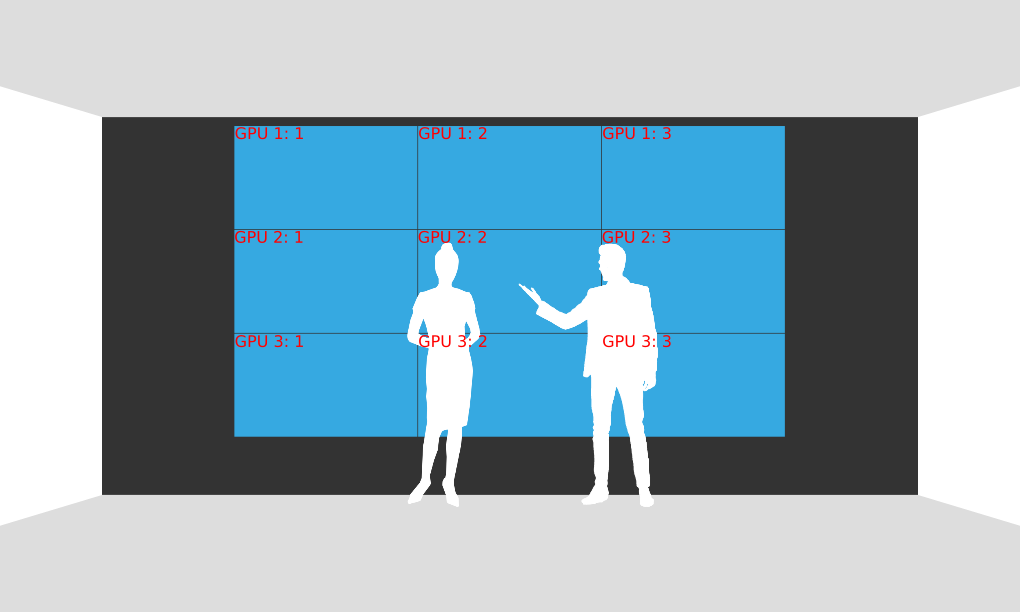
This example 3x3 video wall with landscape displays requires three GPUs. Displays should be connected as shown in the picture above using connectors 1, 2, and 3 on each GPU. GPUs should be installed to slots 1, 3, and 5.
See below for example configuration using 8 pixel bezel compensation.
Windows
Display layout (configuremosaic.exe)
Show
configuremosaic set rows=1 cols=3 out=2,0 out=2,1 out=2,2 bezel=8,0 gridPos=0,0 nextgrid rows=1 cols=3 out=0,0 out=0,1 out=0,2 bezel=8,0 gridPos=0,1080 nextgrid rows=1 cols=3 out=1,0 out=1,1 out=1,2 bezel=8,0 gridPos=0,2160
screen.xml
Show
<!DOCTYPE mtdoc>
<MultiHead>

 <GPU1 type="window">
  <location>0 0</location>
  <size>5776 1080</size>

  <Area1 type="area">
    <location>0 0</location>
    <size>5776 1080</size>
  </Area1>
  <frameless>1</frameless>
 </GPU1>

<GPU2 type="window">
  <location>0 0</location>
  <size>5776 1080</size>

  <Area1 type="area">
    <location>0 0</location>
    <size>5776 1080</size>

    <graphicslocation>0 1088</graphicslocation>
  </Area1>
  <frameless>1</frameless>
</GPU2>

<GPU3 type="window">
  <location>0 0</location>
  <size>5776 1080</size>

  <Area1 type="area">
    <location>0 0</location>
    <size>5776 1080</size>

    <graphicslocation>0 2176</graphicslocation>
  </Area1>
  <frameless>1</frameless>
</GPU3>

</MultiHead>
config.txt
Show
NetBridge {
  host = "10.77.84.101"
  input-translate = "0 0"
}

NetBridge {
  host = "10.77.84.102"
  input-translate = "1928 0"
}

NetBridge {
  host = "10.77.84.103"
  input-translate = "3848 0"
}


NetBridge {
  host = "10.77.84.104"
  input-translate = "0 1088"
}

NetBridge {
  host = "10.77.84.105"
  input-translate = "1928 1088"
}

NetBridge {
  host = "10.77.84.106"
  input-translate = "3848 1088"
}


NetBridge {
  host = "10.77.84.107"
  input-translate = "0 2176"
}

NetBridge {
  host = "10.77.84.108"
  input-translate = "1928 2176"
}

NetBridge {
  host = "10.77.84.109"
  input-translate = "3848 2176"
}
Linux
Display layout (xorg.conf)
Show
Section "ServerLayout"
    Identifier     "Layout0"
    Screen      0  "Screen0" 0 0
    Screen      1  "Screen1" Below "Screen2"
    Screen      2  "Screen2" Below "Screen0"
    Option         "Xinerama" "0"
    Option         "BlankTime" "0"
    Option         "StandbyTime" "0"
    Option         "SuspendTime" "0"
    Option         "OffTime" "0"
EndSection

Section "Device"
    Identifier     "Device0"
    Driver         "nvidia"
    VendorName     "NVIDIA Corporation"
    BoardName      "Quadro RTX 4000"
    BusID          "PCI:141:0:0"
EndSection

Section "Device"
    Identifier     "Device1"
    Driver         "nvidia"
    VendorName     "NVIDIA Corporation"
    BoardName      "Quadro RTX 4000"
    BusID          "PCI:28:0:0"
EndSection

Section "Device"
    Identifier     "Device2"
    Driver         "nvidia"
    VendorName     "NVIDIA Corporation"
    BoardName      "Quadro RTX 4000"
    BusID          "PCI:27:0:0"
EndSection

Section "Screen"
    Identifier     "Screen0"
    Device         "Device0"
    DefaultDepth    24
    Option         "metamodes" "Connector-0: nvidia-auto-select +0+0, Connector-1: nvidia-auto-select +1928+0, Connector-2: nvidia-auto-select +3856+0"
    Option         "CustomEDID" "Connector-0:/etc/X11/mt557d-edid.txt; Connector-1: /etc/X11/mt557d-edid.txt; Connector-2: /etc/X11/mt557d-edid.txt"
    Option         "ConnectedMonitor" "Connector-0, Connector-1, Connector-2"
EndSection

Section "Screen"
    Identifier     "Screen1"
    Device         "Device1"
    DefaultDepth    24
    Option         "metamodes" "Connector-0: nvidia-auto-select +0+0, Connector-1: nvidia-auto-select +1928+0, Connector-2: nvidia-auto-select +3856+0"
    Option         "CustomEDID" "Connector-0:/etc/X11/mt557d-edid.txt; Connector-1: /etc/X11/mt557d-edid.txt; Connector-2: /etc/X11/mt557d-edid.txt"
    Option         "ConnectedMonitor" "Connector-0, Connector-1, Connector-2"
EndSection

Section "Screen"
    Identifier     "Screen2"
    Device         "Device2"
    DefaultDepth    24
    Option         "metamodes" "Connector-0: nvidia-auto-select +0+0, Connector-1: nvidia-auto-select +1928+0, Connector-2: nvidia-auto-select +3856+0"
    Option         "CustomEDID" "Connector-0:/etc/X11/mt557d-edid.txt; Connector-1: /etc/X11/mt557d-edid.txt; Connector-2: /etc/X11/mt557d-edid.txt"
    Option         "ConnectedMonitor" "Connector-0, Connector-1, Connector-2"
EndSection
screen.xml
Show
<!DOCTYPE mtdoc>
<MultiHead>

  <GPU1 type="window">
    <location>0 0</location>
    <size>5776 1080</size>

    <Area1 type="area">
      <location>0 0</location>
      <size>5776 1080</size>
    </Area1>
    <frameless>1</frameless>
    <screennumber>0</screennumber>
  </GPU1>

  <GPU2 type="window">
    <location>0 0</location>
    <size>5776 1080</size>

    <Area1 type="area">
      <location>0 0</location>
      <size>5776 1080</size>

      <graphicslocation>0 1088</graphicslocation>
    </Area1>
    <frameless>1</frameless>
    <screennumber>2</screennumber>
  </GPU2>

  <GPU3 type="window">
    <location>0 0</location>
    <size>5776 1080</size>

    <Area1 type="area">
      <location>0 0</location>
      <size>5776 1080</size>

      <graphicslocation>0 2176</graphicslocation>
    </Area1>
    <frameless>1</frameless>
    <screennumber>1</screennumber>
  </GPU3>

</MultiHead>
config.txt
Show
NetBridge {
  host = "10.77.84.101"
  input-translate = "0 0"
}

NetBridge {
  host = "10.77.84.102"
  input-translate = "1928 0"
}

NetBridge {
  host = "10.77.84.103"
  input-translate = "3848 0"
}


NetBridge {
  host = "10.77.84.104"
  input-translate = "0 1088"
}

NetBridge {
  host = "10.77.84.105"
  input-translate = "1928 1088"
}

NetBridge {
  host = "10.77.84.106"
  input-translate = "3848 1088"
}


NetBridge {
  host = "10.77.84.107"
  input-translate = "0 2176"
}

NetBridge {
  host = "10.77.84.108"
  input-translate = "1928 2176"
}

NetBridge {
  host = "10.77.84.109"
  input-translate = "3848 2176"
}
4x3 landscape video wall
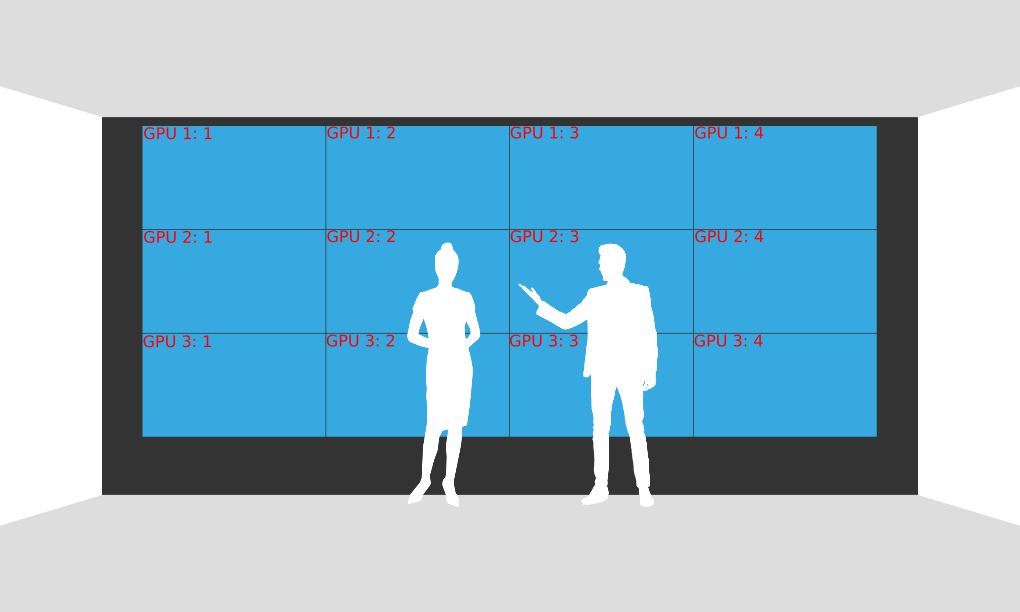
This example 4x3 video wall with landscape displays requires three GPUs. Displays should be connected as shown in the picture above using connectors 1, 2, 3, and 4 as labeled on each GPU. GPUs should be installed to slots 1, 3, and 5.
See below for example configuration using 8 pixel bezel compensation.
Windows
Display layout (configuremosaic.exe)
Show
configuremosaic set rows=1 cols=4 out=2,0 out=2,1 out=2,2 out=2,3 bezel=8,0 gridPos=0,0 nextgrid rows=1 cols=4 out=0,0 out=0,1 out=0,2 out=0,3 bezel=8,0 gridPos=0,1080 nextgrid rows=1 cols=4 out=1,0 out=1,1 out=1,2 out=1,3 bezel=8,0 gridPos=0,2160
screen.xml
Show
<!DOCTYPE mtdoc>
<MultiHead>

 <GPU1 type="window">
  <location>0 0</location>
  <size>7704 1080</size>

  <Area1 type="area">
    <location>0 0</location>
    <size>7704 1080</size>
  </Area1>
  <frameless>1</frameless>
 </GPU1>

<GPU2 type="window">
  <location>0 0</location>
  <size>7704 1080</size>

  <Area1 type="area">
    <location>0 0</location>
    <size>7704 1080</size>

    <graphicslocation>0 1088</graphicslocation>
  </Area1>
  <frameless>1</frameless>
</GPU2>

<GPU3 type="window">
  <location>0 0</location>
  <size>7704 1080</size>

  <Area1 type="area">
    <location>0 0</location>
    <size>7704 1080</size>

    <graphicslocation>0 2176</graphicslocation>
  </Area1>
  <frameless>1</frameless>
</GPU3>

</MultiHead>
config.txt
Show
NetBridge {
  host = "10.77.84.101"
  input-translate = "0 0"
}

NetBridge {
  host = "10.77.84.102"
  input-translate = "1928 0"
}

NetBridge {
  host = "10.77.84.103"
  input-translate = "3848 0"
}

NetBridge {
  host = "10.77.84.104"
  input-translate = "5776 0"
}


NetBridge {
  host = "10.77.84.105"
  input-translate = "0 1088"
}

NetBridge {
  host = "10.77.84.106"
  input-translate = "1928 1088"
}

NetBridge {
  host = "10.77.84.107"
  input-translate = "3848 1088"
}

NetBridge {
  host = "10.77.84.108"
  input-translate = "5776 1088"
}


NetBridge {
  host = "10.77.84.109"
  input-translate = "0 2176"
}

NetBridge {
  host = "10.77.84.110"
  input-translate = "1928 2176"
}

NetBridge {
  host = "10.77.84.111"
  input-translate = "3848 2176"
}

NetBridge {
  host = "10.77.84.112"
  input-translate = "5776 2176"
}
Linux
Display layout (xorg.conf)
Show
Section "ServerLayout"
    Identifier     "Layout0"
    Screen      0  "Screen0" 0 0
    Screen      1  "Screen1" Below "Screen2"
    Screen      2  "Screen2" Below "Screen0"
    Option         "Xinerama" "0"
    Option         "BlankTime" "0"
    Option         "StandbyTime" "0"
    Option         "SuspendTime" "0"
    Option         "OffTime" "0"
EndSection

Section "Device"
    Identifier     "Device0"
    Driver         "nvidia"
    VendorName     "NVIDIA Corporation"
    BoardName      "Quadro RTX 4000"
    BusID          "PCI:141:0:0"
EndSection

Section "Device"
    Identifier     "Device1"
    Driver         "nvidia"
    VendorName     "NVIDIA Corporation"
    BoardName      "Quadro RTX 4000"
    BusID          "PCI:28:0:0"
EndSection

Section "Device"
    Identifier     "Device2"
    Driver         "nvidia"
    VendorName     "NVIDIA Corporation"
    BoardName      "Quadro RTX 4000"
    BusID          "PCI:27:0:0"
EndSection

Section "Screen"
    Identifier     "Screen0"
    Device         "Device0"
    DefaultDepth    24
    Option         "metamodes" "Connector-0: nvidia-auto-select +0+0, Connector-1: nvidia-auto-select +1928+0, Connector-2: nvidia-auto-select +3856+0, Connector-3: nvidia-auto-select +5784+0"
    Option         "CustomEDID" "Connector-0:/etc/X11/mt557d-edid.txt; Connector-1: /etc/X11/mt557d-edid.txt; Connector-2: /etc/X11/mt557d-edid.txt; Connector-3: /etc/X11/mt557d-edid.txt"
    Option         "ConnectedMonitor" "Connector-0, Connector-1, Connector-2, Connector-3"
EndSection

Section "Screen"
    Identifier     "Screen1"
    Device         "Device1"
    DefaultDepth    24
    Option         "metamodes" "Connector-0: nvidia-auto-select +0+0, Connector-1: nvidia-auto-select +1928+0, Connector-2: nvidia-auto-select +3856+0, Connector-3: nvidia-auto-select +5784+0"
    Option         "CustomEDID" "Connector-0:/etc/X11/mt557d-edid.txt; Connector-1: /etc/X11/mt557d-edid.txt; Connector-2: /etc/X11/mt557d-edid.txt; Connector-3: /etc/X11/mt557d-edid.txt"
    Option         "ConnectedMonitor" "Connector-0, Connector-1, Connector-2, Connector-3"
EndSection

Section "Screen"
    Identifier     "Screen2"
    Device         "Device2"
    DefaultDepth    24
    Option         "metamodes" "Connector-0: nvidia-auto-select +0+0, Connector-1: nvidia-auto-select +1928+0, Connector-2: nvidia-auto-select +3856+0, Connector-3: nvidia-auto-select +5784+0"
    Option         "CustomEDID" "Connector-0:/etc/X11/mt557d-edid.txt; Connector-1: /etc/X11/mt557d-edid.txt; Connector-2: /etc/X11/mt557d-edid.txt; Connector-3: /etc/X11/mt557d-edid.txt"
    Option         "ConnectedMonitor" "Connector-0, Connector-1, Connector-2, Connector-3"
EndSection
screen.xml
Show
<!DOCTYPE mtdoc>
<MultiHead>

  <GPU1 type="window">
    <location>0 0</location>
    <size>7704 1080</size>

    <Area1 type="area">
      <location>0 0</location>
      <size>7704 1080</size>
    </Area1>
    <frameless>1</frameless>
    <screennumber>0</screennumber>
  </GPU1>

  <GPU2 type="window">
    <location>0 0</location>
    <size>7704 1080</size>

    <Area1 type="area">
      <location>0 0</location>
      <size>7704 1080</size>

      <graphicslocation>0 1088</graphicslocation>
    </Area1>
    <frameless>1</frameless>
    <screennumber>2</screennumber>
  </GPU2>

  <GPU3 type="window">
    <location>0 0</location>
    <size>7704 1080</size>

    <Area1 type="area">
      <location>0 0</location>
      <size>7704 1080</size>

      <graphicslocation>0 2176</graphicslocation>
    </Area1>
    <frameless>1</frameless>
    <screennumber>1</screennumber>
  </GPU3>

</MultiHead>
config.txt
Show
NetBridge {
  host = "10.77.84.101"
  input-translate = "0 0"
}

NetBridge {
  host = "10.77.84.102"
  input-translate = "1928 0"
}

NetBridge {
  host = "10.77.84.103"
  input-translate = "3848 0"
}

NetBridge {
  host = "10.77.84.104"
  input-translate = "5776 0"
}


NetBridge {
  host = "10.77.84.105"
  input-translate = "0 1088"
}

NetBridge {
  host = "10.77.84.106"
  input-translate = "1928 1088"
}

NetBridge {
  host = "10.77.84.107"
  input-translate = "3848 1088"
}

NetBridge {
  host = "10.77.84.108"
  input-translate = "5776 1088"
}


NetBridge {
  host = "10.77.84.109"
  input-translate = "0 2176"
}

NetBridge {
  host = "10.77.84.110"
  input-translate = "1928 2176"
}

NetBridge {
  host = "10.77.84.111"
  input-translate = "3848 2176"
}

NetBridge {
  host = "10.77.84.112"
  input-translate = "5776 2176"
}