MT Showcase Deployment Architecture
The architecture for the MT Showcase Editor is summarized below.
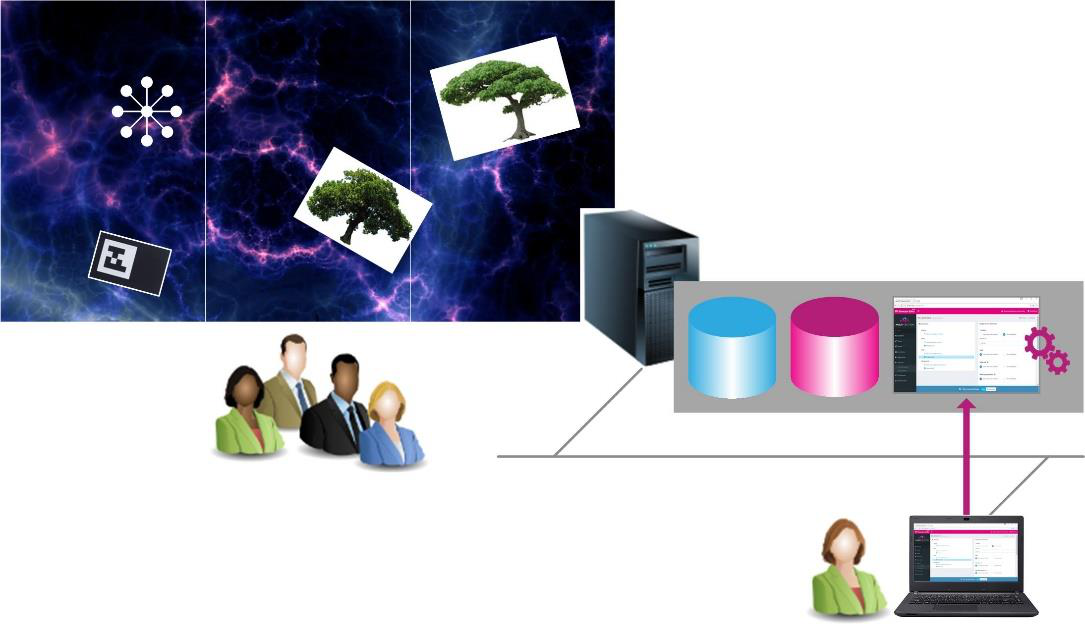
MT Showcase Editor architecture
Application computer. This external computer hosts the MT Showcase server, client and Editor web server. It also has video connections to each Cell in the video wall. The server supplies the client with the data it needs to display MT Showcase apps. The client displays the content and handles touch events for MT Showcase apps, based on data received from the server.
Application database. This contains the main MT Showcase data, including apps, structures, themes, and content sets.
Reporting database. This contains content usage data captured by the Data Gathering feature. The reporting database can optionally run on a remote server if, for example, you want to consolidate event records from multiple video walls.
MT Showcase Editor web server. The Editor is a tool for creating custom MT Showcase apps.
App designers connect to the Editor through a browser.
The MT Showcase client runs apps on your video wall.
Multiple users can interact with MT Showcase apps simultaneously.